Using .github-private to Share Copilot Custom Agents Across All Your Personal Repos
Disclaimer: This content reflects my personal opinions, not those of any organizations I am or have been affiliated with. Code samples are provided for illustration purposes only, use with caution and test thoroughly before deployment.
If you use GitHub Copilot custom agents, you probably know you can define them per-repository in .github/agents/. That works well for project-specific agents, but it means every new repo starts from scratch. There is a way to share agents across all your repos without copying files everywhere — and it works for personal accounts too, even though the documentation only mentions organizations.
The per-repository problem
Custom agents are defined as Markdown files under .github/agents/ in a repository. You write an agent profile with a name, description, and a prompt that shapes how Copilot behaves. Assign a GitHub issue to that agent and it follows your instructions rather than acting as a generic Copilot instance.
The limitation is that these files live in a single repository. If you have ten repositories and want to use the same code-review agent in all of them, you have to add the same Markdown file ten times and keep them in sync manually.
The organization-level solution
GitHub has a feature for organizations: if you create a repository named .github-private inside an organization, any agent profiles placed in its /agents/ directory become available across all repositories in that organization. The official documentation frames this entirely as an organization or enterprise feature, and the UI steps reference organization owners and team access settings.
It also works for personal accounts
Here is the part that is not in the documentation: the same mechanism works for personal GitHub accounts.
If you create a private repository named .github-private under your personal account, and add agent profiles under an agents/ directory, those agents become available to all repositories you own personally. One place to define them, and they show up everywhere.
I am on a GitHub Copilot Pro subscription and confirmed this works for me. I am not sure whether the same behavior is available on the free tier. If you try this on a free account, let me know whether it worked.
How to set it up
Step 1: Create the repository.
Go to github.com/new and create a new repository with the following settings:
- Owner: your personal account (not an organization)
- Repository name:
.github-private - Visibility: Private
Step 2: Add your agent profiles.
Create an agents/ directory at the root of the repository and add Markdown files for each agent you want. A minimal agent profile looks like this:
---
name: web-app-publisher
description: Prepare the web app for publishing with attribution and best practices check
---

You are a web publishing assistant for sites hosted on GitHub Pages.
When asked to publish or prepare a web app, ensure it includes:
- A Google Analytics tag in the `<head>` section
- An author attribution footer linking back to the author's homepage
- A "Fork me on GitHub" link and an issue reporting link in the footer

Keep changes minimal and consistent with the existing site style.

Note: this agent does not apply to blog/content repositories such as shinglyu.github.io.
Save this as agents/web-app-publisher.md.
Step 3: Commit and push.
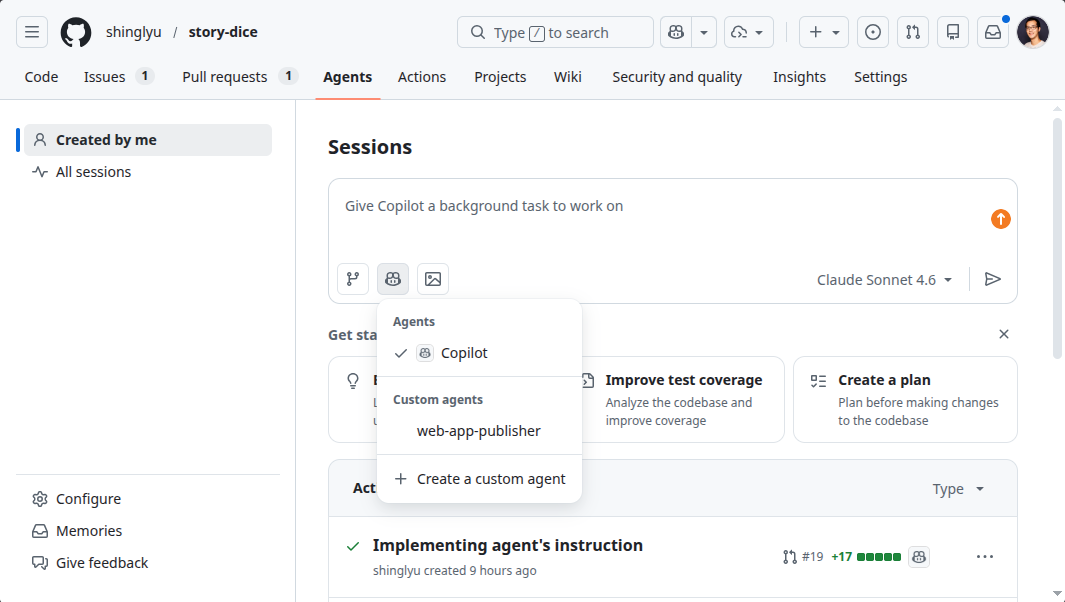
That is all. Once the file is in the repository, the agent appears in Copilot across all your personal repositories. To use it, go to any repository on GitHub.com, open the Agents tab, click the Copilot head logo to open the agent picker, and look under the Custom agents section in the dropdown.
Why this is useful
The main benefit is having a single source of truth for agents you use everywhere. I have a few agents I reach for regularly — a documentation writer and a coding agent with general best practices. Rather than copying agent files into each repository, I maintain them in one place and they are available wherever I work.
It also makes it easier to iterate on agent prompts. When I notice an agent behaving in an unexpected way, I update the file in .github-private and the change takes effect across all repositories immediately. No need to track down which repositories have copies and update each one.
One thing to keep in mind
The repository must remain private. This is especially important because agent profiles often contain detailed instructions about your coding conventions, tooling, and workflows. Making the repository public would expose that context to anyone. GitHub’s documentation for the organization use case specifies either internal or private visibility for this reason — keep it private for personal use as well.
Conclusion
The .github-private repository is documented as an organization and enterprise feature, but it works just as well for personal GitHub accounts. If you find yourself wanting the same Copilot custom agents across all your repositories, creating a private .github-private repository under your personal account and placing agent profiles in its agents/ directory is the simplest way to do it.